
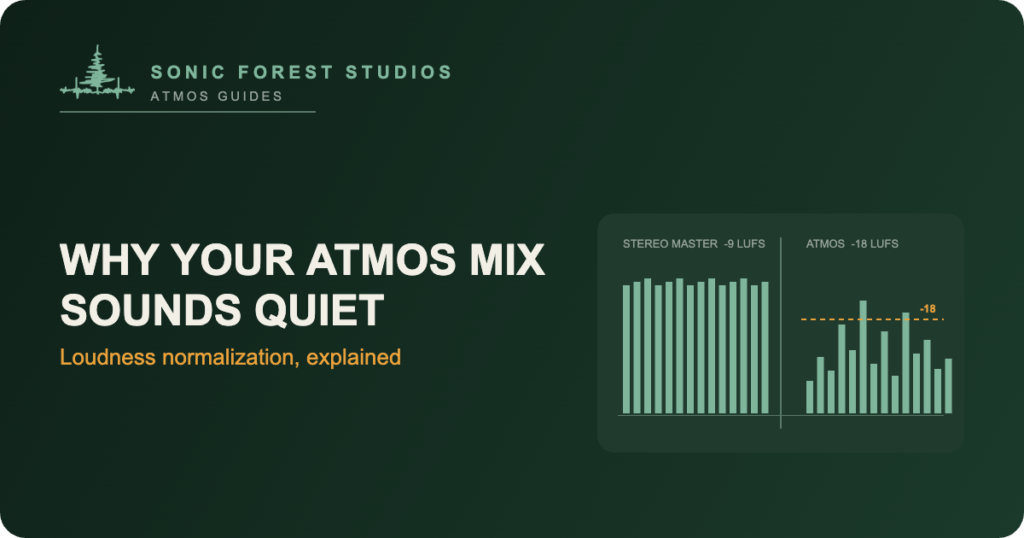
Why does my Atmos mix sound quiet? I hear some version of that question almost every time I deliver a first Dolby Atmos mix, so let’s answer it up front. Your Atmos master is delivered at -18 LUFS integrated, which is anywhere from 4 to 9 dB quieter than most modern stereo masters, and every service that streams Atmos plays it back through loudness normalization. Nothing is broken. The platform levels every track to the same average loudness on playback, so the loudness contest that shaped stereo mastering for two decades doesn’t exist in Atmos. What you hear when you A/B the raw files on your desktop is a difference in storage level, not a difference in what listeners will hear.
The number doing all the work: -18 LUFS
Apple Music asks for Atmos deliveries at -18 LKFS integrated, measured to the ITU BS.1770 standard, with true peak at or below -1 dBTP. The full spec lives in Apple’s Video and Audio Asset Guide. LKFS and LUFS are the same unit with two names, so I’ll stick with LUFS from here. Amazon Music and Tidal accept masters in the same neighbourhood, because everyone is rendering from the same ADM BWF file and nobody wants a master that clips after binaural processing.
I covered the full Apple spec, including the rejection triggers, in my article on Apple Music spatial audio requirements. The loudness line is the one that surprises people most. Minus 18. That’s a long way down from where stereo masters have lived since the early 2000s, and it’s the single biggest reason a fresh Atmos print feels polite next to a commercial stereo release.
What loudness normalization actually does
The mechanics are simple. The service measures the integrated loudness of the whole track, compares it to a playback target, and applies one fixed gain offset. Spotify normalizes stereo to -14 LUFS by default. Apple’s Sound Check lands near -16. For Atmos streams, the platform works from the delivery spec itself, so every Atmos track starts from the same -18 reference.
One offset for the whole song. Your quiet verse stays quiet relative to your loud chorus, and the dynamics you fought for survive the trip. What doesn’t survive is any advantage from being loud. A master that measures hotter than the target just gets turned down, and all that limiting buys you nothing except squashed transients.
Stereo loudness habits don’t transfer
Stereo mastering spent twenty years in an arms race. Brickwall limiters, clipped converters, masters sitting at -8 or -9 LUFS, all of it chasing the idea that louder songs win. The loudness war made sense when playback was a CD player or an unnormalized download, because the loud master really did jump out of the speakers.
Atmos was built after that war ended. You deliver an ADM BWF, which is a container of audio beds and objects plus the metadata that tells the renderer where everything sits. The renderer rebuilds your mix for whatever the listener owns… a 7.1.4 room, a soundbar, a car, a pair of AirPods. Then the platform levels the result. There’s no master bus to slam in the traditional sense, and even if you squeeze the print hot, normalization takes it right back. The contest is over. Balance won.
Why your Atmos mix sounds quiet on headphones
Here’s the A/B trap I see most. You bounce a binaural re-render of the Atmos mix, drop it in a session next to the mastered stereo file, match the faders, and press play. The stereo file feels bigger, and you conclude your Atmos mix sounds quiet. Of course it does – it’s 6 dB hotter on disk and it’s been through a mastering limiter. The binaural render is also doing spatial work, spreading energy around a virtual room instead of pushing it all straight at your eardrums.
My routine at the end of every delivery is the same: I check the mix on the platform, not just in the session. Sound Check on, Atmos version against the stereo version, played back the way a subscriber actually hears them. Level-matched by the service, the two versions trade punch for space, and the Atmos side usually has air and depth the stereo file can’t touch. That’s the honest comparison. Raw files on a desktop will lie to you every time.
What this means for your master
So my Atmos mix sounds quiet on the desktop… is that fine? Yes. It means dynamics are an asset again. Punch comes from contrast, from a chorus that steps up because the verse left it room, not from absolute level. Keep your integrated loudness at -18 LUFS, keep true peaks at or under -1 dBTP so the binaural and soundbar renders don’t clip, and spend your energy on balance instead of level. If the mix measures a little under target, that’s usually fine too… platforms are far more forgiving of quiet than of clipping.
And if a label or aggregator hands you a different number, follow their sheet. Specs drift, and the delivery doc always outranks the blog post.
How to check your levels before delivery
You don’t need a mastering suite to know where you stand. Load the stereo and binaural re-renders from your ADM BWF into any loudness meter that reads BS.1770 integrated loudness and true peak. iZotope Insight, the free Youlean Loudness Meter, even the stats window in most DAWs will get you there. You’re looking for two numbers: integrated loudness at or near -18 LUFS, and true peak no higher than -1 dBTP.
Then listen the way your audience will. Binaural on regular earbuds, the stereo re-render on laptop speakers, the full bed in the room if you have one. If the mix holds together at -18 across those systems, it’s ready. If it only works loud, that’s a balance problem wearing a loudness costume, and no amount of gain will fix it.
Costs and timelines for this kind of work are in my Atmos mix pricing article, and if you’d rather have a second set of ears on your delivery, the Dolby Atmos mixing page covers how I work.
Questions I actually get about Atmos loudness
What loudness should a Dolby Atmos music mix be?
Minus 18 LUFS integrated, measured over the whole track to BS.1770, with true peak at or below -1 dBTP. That’s Apple’s line and the safe target across services. Check your distributor’s spec sheet before delivery, because their number wins.
Will listeners hear my Atmos mix quieter than my stereo master?
No. On any normalized platform both versions play at the same average loudness. The raw files measure differently, but playback levels them, so the mixes compete on quality instead of volume.
Should I limit my Atmos mix harder so it competes?
No. Normalization cancels the level gain and you keep the distortion. In Atmos the limiting also fights the renderer, which needs headroom to fold your mix down for smaller systems.
Why does the binaural render feel quieter than the stereo file?
It’s stored around 6 dB lower and the binaural process spreads energy across a virtual space instead of stacking it front and centre. Compare on the platform with normalization on, not raw files in a session.
Does Spotify stream Dolby Atmos?
No. As of August 2026, Spotify streams stereo only. They added lossless in September 2025, but no spatial formats. Apple Music, Amazon Music, and Tidal are where Atmos mixes get heard.
Does loudness normalization squash my dynamics?
No. It applies one fixed gain change to the whole track, so the distance between your quietest and loudest moments stays exactly as you mixed it. It’s the loudness war that squashed dynamics, not normalization.
Todd Hooge is the founder of Sonic Forest Studios, the first Dolby Atmos facility on Vancouver Island. He mixes music and film in Atmos from a 7.1.4 room outside Victoria BC, with more than 456 million streams across his Atmos work.