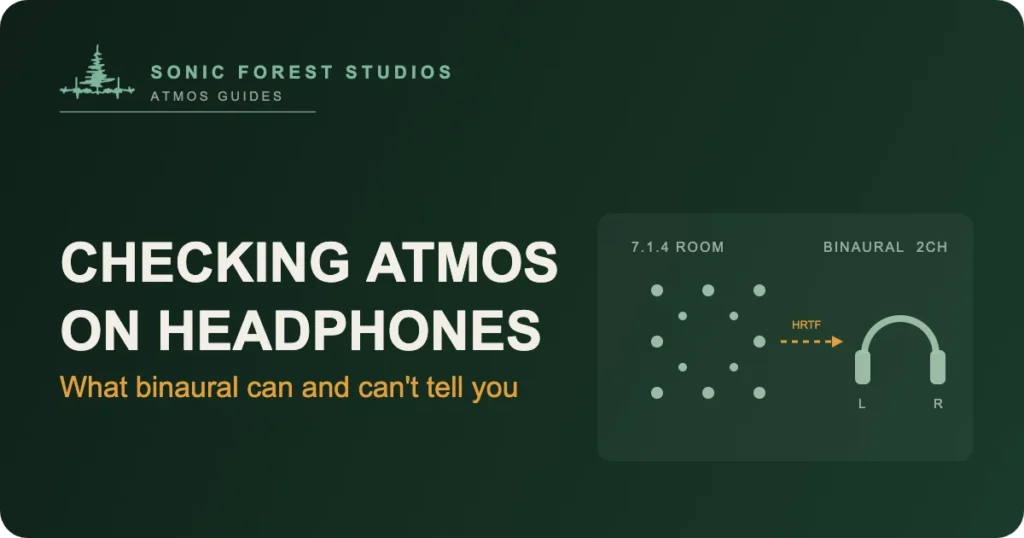
Can you trust what you hear when you check Dolby Atmos on headphones? Partly. Headphones play a binaural render of your mix: a two-channel simulation of a 7.1.4 room, calculated by an algorithm instead of reproduced by speakers. That render is useful for checking translation, relative balance, and obvious placement mistakes. It can’t confirm your bed levels, your LFE, or how the mix behaves in a real room. Most Atmos listening happens on headphones, so you should absolutely check there. But you shouldn’t make final mix decisions there. Here’s what binaural playback shows you, what it hides, and the checklist we run at Sonic Forest Studios before anything ships.
What a binaural render actually is
An Atmos mix isn’t a fixed set of channels. It’s up to 118 objects plus a 7.1.2 bed, and every playback system renders that master differently. When you listen on headphones, the Dolby Renderer collapses all of it into two channels using head-related transfer functions, or HRTFs. An HRTF is a model of how a sound arriving from a given direction gets shaped by an average human head, ears, and shoulders before it reaches the eardrums. Bake those cues into a stereo signal and your brain reads space that isn’t there.
The renderer also gives you a distance control for every object and bed channel: the binaural render modes. Near, mid, far, or off. Near sits the sound close to your head, far pushes it out into the simulated room, and off folds it straight down with no spatial processing at all. Those settings travel with your master inside the ADM BWF file, so they’re mix decisions, not playback preferences.
What headphones can tell you
Plenty, which is why we always check there. Binaural playback is how the majority of your audience will meet the mix, and it’s honest about some things. Balance problems show up fast: a lead vocal that’s 2 dB shy reads just as shy on AirPods as it does in the room. Automation mistakes, clicks, bad edits, and phase oddities all survive the fold-down. So do placement errors that are big enough to matter, like a background vocal you meant to tuck behind the listener that’s sitting out front instead.
Headphones are also the right place to sanity-check loudness feel against your stereo reference. An Atmos master targets -18 LUFS integrated, a long way under a modern stereo master, and streaming normalization is what levels that field. We covered the whole story in Why Does My Atmos Mix Sound Quiet? if the gap surprises you.
What headphones can’t tell you
The LFE channel, first and most important. Dolby’s binaural render leaves LFE out entirely. If a chunk of your low end lives in the LFE channel, a headphone check simply never hears it, and a mix that felt fine on AirPods can arrive in a theatre with 10 dB of sub you never auditioned. That one detail catches more people than anything else on this list.
Height is the second gap. HRTFs are built from average heads, and yours isn’t average. Some listeners get convincing elevation from a generic binaural render. Others hear height objects as slightly brighter sounds at ear level. You can’t verify a height gesture on headphones; you can only verify it exists.
And there’s no room. No speaker interaction, no bass buildup in corners, no crossover behavior, no sense of how hard the surrounds work when real air is moving. A calibrated 7.1.4 room tells you what the mix does physically. Headphones tell you what an algorithm thinks it should sound like.
Apple Music does its own thing
Here’s the part that surprises even experienced engineers: Apple Music doesn’t use Dolby’s binaural renderer for playback. Apple applies its own spatial processing to your Atmos master, with its own HRTF work and optional head tracking, which is why a mix can sound noticeably different on AirPods than it did in the Renderer’s headphone monitoring. Apple’s own documentation lays out the device side of it. The practical rule: check in the Dolby Renderer and on an actual iPhone with AirPods, because they’re two different renders of the same master. We walked through Apple’s delivery specs in Apple Music Spatial Audio Requirements.
The checklist we run before anything ships
Our headphone pass at the studio looks like this. We listen to the binaural render in the Dolby Renderer with the shipped render modes, front to back, no skipping. We A/B against the stereo master at matched loudness to catch balance drift. We play the master on an iPhone through AirPods via Apple Music’s spatial processing, head tracking off, then briefly on. We solo the LFE in the room afterward, because headphones never audition it. And we listen once on cheap earbuds, since a surprising share of the audience lives there. None of that replaces the room check; it sits beside it.
Where a certified room fits
Binaural checking is a translation tool, and it’s a good one. What it can’t be is the reference. The reference is a calibrated 7.1.4 room where bed levels, LFE, and height information play back as physical sound, which is exactly what our certified room outside Victoria BC exists for. If you’ve built an Atmos mix on headphones and want to hear what it actually does before release, our Dolby Atmos mixing room is where that happens. Dolby’s own music production resources say the same thing in more diplomatic language: headphones for access, speakers for truth.
FAQ: checking Atmos on headphones
Do I need special headphones to check a Dolby Atmos mix?
No. A binaural render is ordinary two-channel audio, so any honest stereo pair works. Use the headphones you know best rather than the fanciest ones in the room.
Does the LFE channel play in a binaural render?
No. Dolby’s binaural render excludes LFE, so anything routed there is inaudible on headphones. Check LFE content on speakers or keep essential low end in the bed and objects instead.
Why does my mix sound different on AirPods than in the Dolby Renderer?
Apple Music applies its own spatial processing to your Atmos master instead of using Dolby’s binaural render. They’re two different renders of the same file, so check both before release.
Can I mix an entire Atmos project on headphones?
You can build one there, and plenty of good work starts that way. But bed levels, LFE, and height behavior need a calibrated room before release, because the binaural render can’t verify them.
What do the near, mid, and far binaural render modes do?
They set how distant each object or bed channel feels in the headphone render. Near sits close to the head, far pushes into the simulated room, and off bypasses spatial processing for that element.
Should my Atmos mix sound as loud as my stereo master on headphones?
No. Atmos masters target -18 LUFS integrated, well under a stereo master, and streaming normalization levels the playing field. Matched-loudness comparison is the honest way to A/B them.
Todd Hooge is the founder of Sonic Forest Studios, the first Dolby Atmos facility on Vancouver Island. He mixes music and film in Atmos from a 7.1.4 room outside Victoria BC, with more than 456 million streams across his Atmos work.